
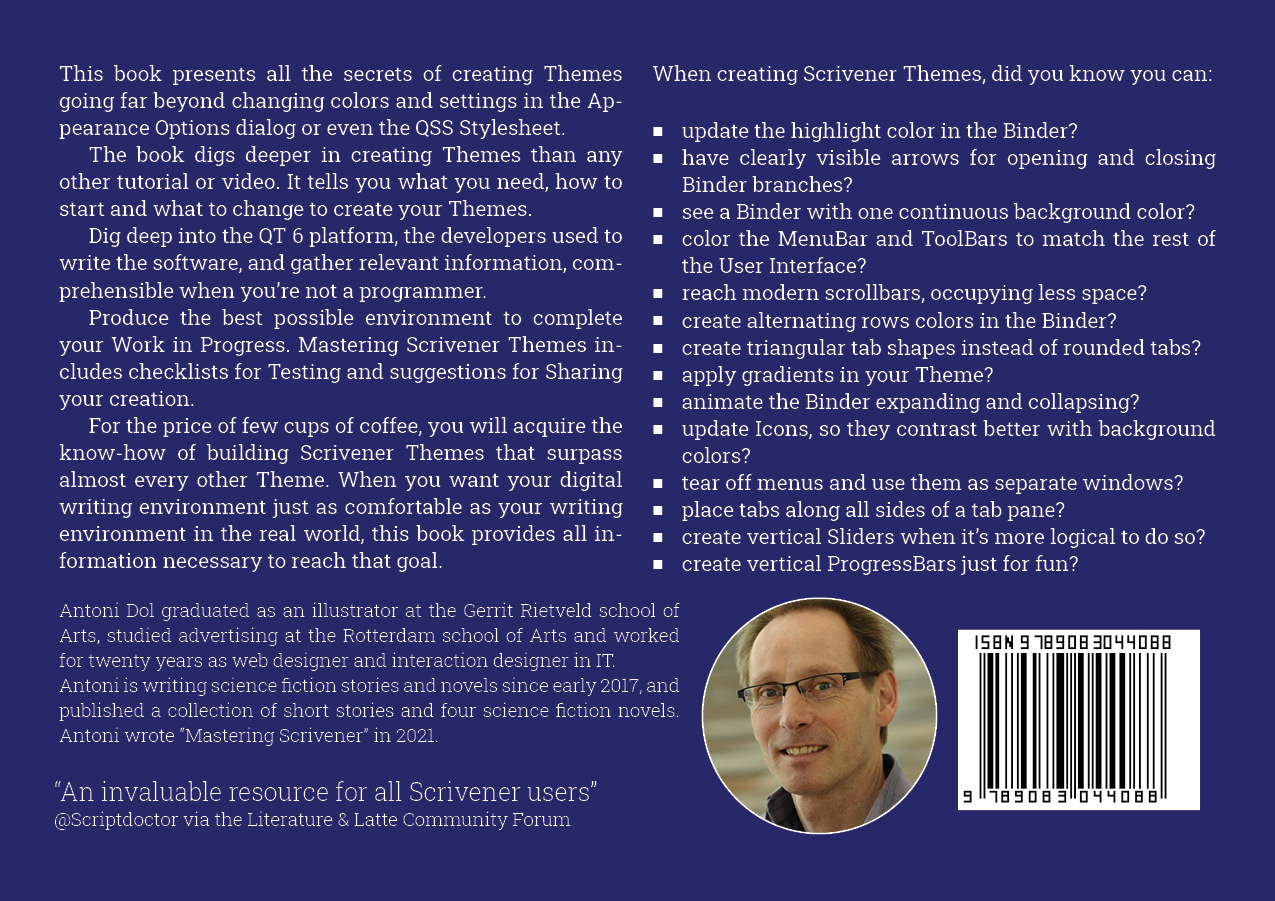
Mastering Scrivener Themes Creating your personal digital writing environment
E-book254 pagina’sEngelsLeverbaar
CoverFrench TitleTitle PageColophon & CopyrightsDedicationTable of Contents1 - Introducing1.1 - Prologue1.2 - Introduction1.3 - A primer for new Theme Builders2 - Preparing2.1 - Inspiring writing environments2.2 - What you need2.3 - Preparation2.4 - Your Theme building Environment3 - Starting3.1 - About Theme files3.2 - Choosing a basic Theme to adapt3.3 - Naming and Packaging a Theme3.4 - The Manifest3.5 - The Palette3.6 - The Preferences3.7 - The Stylesheet3.8 - The Script4 - Changing4.1 - Colors4.2 - Borders4.3 - Icons4.4 - Fonts4.5 - Patterns and Backgrounds4.6 - Applying Appearance Options5 - Styling Scrivener5.1 - Frequently Asked Questions and their solutions5.2 - About Styling Scrivener5.3 - Styling the Main Window and Splitters5.4 - Styling MenuBar and Menus5.5 - Styling Toolbars and ToolButtons5.6 - Styling the Binder5.7 - Styling the Editor5.8 - Styling the Inspector5.9 - Styling Scrivenings5.10 - Styling the Corkboard5.11 - Styling the Outliner5.12 - Styling the Options Dialog5.13 - Styling the Project Settings window5.14 - Styling the Compile Overview window5.15 - Styling the Compile Format Designer5.16 - Styling ToolTips and Messageboxes5.17 - Styling Pop-ups5.18 - Styling the other windows6 - Styling User Interface controls6.1 - About User Interface controls6.2 - Styling the Application Window6.3 - Styling Lines6.4 - Styling Labels6.5 - Styling ToolTips6.6 - Styling TextBoxes6.7 - Styling CheckBoxes and RadioButtons6.8 - Styling Toolbars and ToolButtons6.9 - Styling PushButtons6.10 - Styling Sliders6.11 - Styling GroupBoxes6.12 - Styling ComboBoxes6.13 - Styling SpinBoxes6.14 - Styling MessageBoxes6.15 - Styling ProgressBars6.16 - Styling the Statusbar6.17 - Styling MenuBars and Menu-items6.18 - Styling the TabBar and Tabs6.19 - Styling ScrollBars6.20 - Styling HeaderViews6.21 - Styling ListViews6.22 - Styling TableViews6.23 - Styling TreeViews7 - Grinding7.1 - About Grinding7.2 - The Platform7.3 - The structure of the Scrivener User Interface7.4 - Impediments to styling8 - Experimenting8.1 - About Experimenting8.2 - Methodology8.3 - The State of the Art8.4 - Wishful thinking9 - Testing9.1 - Testing your Theme10 - Sharing10.1 - Sharing your creation11 - Concluding11.1 - The go-to reference11.2 - EpilogueAcknowledgmentsAbout the writerGlossaryCouponMastering Scrivener Themes informs you about creating your personal digital writing environment.This book presents all the secrets of creating Themes going far beyond changing colors and settings in the Appearance Options dialog or even the QSS Stylesheet.The book digs deeper in creating Themes than any other tutorial or video. It tells you what you need, how to start and what to change to create your Themes.Dig deep into the QT 6 platform, the developers used to write the software, and gather relevant information, comprehensible even when you’re not a programmer.Produce the best possible environment to complete your Work in Progress. Mastering Scrivener Themes includes checklists for Testing and suggestions for Sharing your creation.Do you know when creating Scrivener Themes, you can:have clearly visible arrows for opening and closing Binder branches?update the highlight color in the Binder?see a Binder with one continuous background color?color the MenuBar and ToolBars to match the rest of the User Interface?reach modern scrollbars, occupying less space?create alternating row colors in the Binder?create triangular tab shapes instead of rounded tabs?apply gradients in your Theme?animate the Binder expanding and collapsing?update Icons, so they contrast better with background colors?tear off menus and use them as separate floating windows?place tabs along all sides of a tab pane?create vertical Sliders when it’s more logical to do so?create vertical ProgressBars just for fun?For the price of few cups of coffee, you will acquire the know-how of building Scrivener Themes surpassing almost every other Theme. When you want your digital writing environment just as comfortable as your writing environment in the real world, this book provides all information necessary to reach that goal.
In het kort
ISBN-13
9789083044026
Uitgever
Verschenen
15 februari 2023
Serie
Mastering Scrivener · 2
Imprint
Bibliografisch
ISBN-139789083044026
SerieMastering Scrivener — deel 2
Editie1
TaalEngels eng
Pagina’s254
GeïllustreerdJa
Uitgave
Vorm & inhoud
ProductvormE-book ED
VormdetailE200 Reflowable
E101 EPUB
E101 EPUB
SamenstellingPakket (meerdelig)
EPUB-versie3
Beveiliging e-bookGeen 00
Classificatie
NUR (hoofd)Softwarepakketten (boeken over) 991
NUR (alle)991 Softwarepakketten (boeken over)
Medewerkers
Auteur A01Antoni Dol
Gerelateerde producten
Gerelateerd9789083044088 9789083044088
Herkomst
Werk-id (NSTC)501532653
MeldingBevestigd bij publicatie 03
Bijgewerkt6 augustus 2026
Trefwoorden
Lijkt op dit boek
Basishandboek SPSS 32

Inventor 2027

Outlook E-mailen en organiseren

Outlook (new look)

2026 International Rexx Language Symposium Proceedings

AutoCAD 2027
AutoCAD LT 2027

ARTIFICIËLE INTELLIGENTIE VOOR BEGINNERS: Begrijp ChatGPT, Claude, Gemini & Co. gemakkelijk en pas ze praktisch toe

ARTIFICIËLE INTELLIGENTIE VOOR BEGINNERS: Begrijp ChatGPT, Claude, Gemini & Co. gemakkelijk en pas ze praktisch toe

Künstliche Intelligenz für Einsteiger: ChatGPT, Claude, Gemini & Co. einfach verstehen und praktisch anwenden
NSTC 501532653 · CB-relatie 6471437 · Bijgewerkt 6 augustus 2026